
Auvik alternative for network configuration management
Back up your network configs. See what changed. Check your rules. Run rConfig on your own servers.
What "NCM" means here
An Auvik alternative for network configuration management, or NCM for short, needs to back up device configs, show what changed, check rules and restore a good version. Auvik is a monitoring platform that also backs up configs. rConfig does one job: it backs up, compares, checks and restores network configurations, on hosts you control. Below, we show where the two overlap and where they differ, with sources.
Which tool fits your needs?
Auvik and rConfig overlap on config backup and diffs. They differ on everything around it. Start with the job you need done.
Pick Auvik when monitoring is the job
You want one cloud tool that maps the network, watches it, alerts you and shows traffic. Config backup comes with it. If that list is what you need, Auvik fits.
Pick a dedicated NCM when configs are the job
You need backups on your own servers, a clear diff of every change, rules you can check, and a way to restore. rConfig is built for that and nothing else.
Use both, independently
Many teams keep their monitoring tool and add rConfig for configuration control. Each does its own job. There is no integration between them, and none is needed.
Auvik vs rConfig
Both tools back up configs and show diffs. The differences are where the data lives, how you recover, whether you can check rules, and how you pay. Each cell names its source.
Auvik is a trademark of its owner. Auvik details were checked on 11 September 2026 against Auvik's public pages, listed in the dated sources. Where Auvik's pages do not describe a capability, the cell says so rather than claiming the product lacks it. rConfig edition limits come from the rConfig pricing page.
- What mattersWhere it runs and where your data livesAuvikA cloud service. Auvik runs it and stores your backups for you. There is no self-hosted option.5rConfig
- What mattersHow backups are takenAuvikAuvik polls devices for change, every 60 minutes by default. When it finds a change it saves a new backup.1, 2rConfigBackups run on a schedule you set, on demand, by API call, or when a device sends an SNMP trap.7 (All editions)
- What mattersVersions and diffsAuvikrConfig
- What mattersPolicy checksAuvikIts configuration pages describe backup history and audit trails as compliance evidence. Rule-based policy checks are not described there. Ask Auvik if you need them.1, 2rConfig
- What mattersAudit recordsAuvikLogs who accessed a device through Auvik, with a time stamp. The version index records what changed and when.1, 3rConfig
- What mattersRecovery workflowAuvikHuman in the loop. You pick a version, export it as text, and apply it with the device's own restore process. Auvik does not push configs back to devices.1, 2rConfig
- What mattersMonitoring, maps and trafficAuvikIncluded. Network mapping, monitoring, alerting and traffic analysis sit beside configuration management.4rConfigNot included. rConfig is a configuration tool. Keep your monitoring tool and run rConfig beside it.7 (All editions)
- What mattersDevice coverageAuvikAuvik states support for more than 15,000 device types from over 700 vendors.1rConfigMore than 200 ready device profiles. Add a template for any device rConfig can connect to.12 (All editions)
- What mattersLicensingAuvikSubscription, quoted per billable network device. No public price list. 14-day trial with all features.5rConfigFree Core with no device limit. Flat annual price per edition: Starter to 300 devices, Standard to 1,000, Enterprise above that.6 (All editions)
| What matters | Auvik | rConfig |
|---|---|---|
| Where it runs and where your data lives | A cloud service. Auvik runs it and stores your backups for you. There is no self-hosted option.5 | Self-hosted on your own Linux servers or in Docker. Your configs stay on hosts you control.7, 13 (All editions) |
| How backups are taken | Auvik polls devices for change, every 60 minutes by default. When it finds a change it saves a new backup.1, 2 | Backups run on a schedule you set, on demand, by API call, or when a device sends an SNMP trap.7 (All editions) |
| Versions and diffs | Keeps every backup in a version index. Shows a colour-coded diff between any two versions.1, 2 | Every backup is a version. Compare any two, line by line, and flag the devices that changed.8, 6 (Core and above) |
| Policy checks | Its configuration pages describe backup history and audit trails as compliance evidence. Rule-based policy checks are not described there. Ask Auvik if you need them.1, 2 | Write rules once. Run them against saved configs. Get a pass or fail per device, with a report.9, 6 (Starter and above) |
| Audit records | Logs who accessed a device through Auvik, with a time stamp. The version index records what changed and when.1, 3 | Change Manager shows what changed, on which device, when, and how big the change was.10, 6 (Core and above) |
| Recovery workflow | Human in the loop. You pick a version, export it as text, and apply it with the device's own restore process. Auvik does not push configs back to devices.1, 2 | Pick a saved version. rConfig builds the restore commands and sends them to the device from the queue. Needs a role that can send commands, and valid device credentials.11, 6 (Starter and above) |
| Monitoring, maps and traffic | Included. Network mapping, monitoring, alerting and traffic analysis sit beside configuration management.4 | Not included. rConfig is a configuration tool. Keep your monitoring tool and run rConfig beside it.7 (All editions) |
| Device coverage | Auvik states support for more than 15,000 device types from over 700 vendors.1 | More than 200 ready device profiles. Add a template for any device rConfig can connect to.12 (All editions) |
| Licensing | Subscription, quoted per billable network device. No public price list. 14-day trial with all features.5 | Free Core with no device limit. Flat annual price per edition: Starter to 300 devices, Standard to 1,000, Enterprise above that.6 (All editions) |
Looking for an Auvik NCM alternative?
NCM is short for network configuration management. If you want to replace the config part of Auvik, or add a tool beside it, check these five things. Each one says what rConfig does and which edition includes it.
Device coverage
What to check: Ask about the vendors and models you run, not a total count. Test the odd devices, not just the easy ones.
In rConfig: More than 200 ready device profiles. Add a template for any device rConfig can connect to.12 (All editions) Device support docs.Config backups
What to check: How are backups taken, and where are they stored? Can you run one right now?
In rConfig: Backups run on a schedule you set, on demand, by API call, or when a device sends an SNMP trap. They are stored on your own servers.7 (All editions) Configuration backup docs.Change history
What to check: Is every backup kept? Can you compare any two versions and see which devices changed?
In rConfig: Every backup is a version. Compare any two, line by line. Change Manager shows what changed, on which device, and when.8, 10 (Core and above) Change Manager docs.Policy checks
What to check: Can you write a rule and test every saved config against it? An audit trail is not the same thing.
In rConfig: Write rules once. Run them against saved configs. Get a pass or fail per device, with a report.9 (Starter and above) Policy compliance docs.Recovery
What to check: How do you get a device back to a known good config? Who can do it, and what does it need?
In rConfig: Pick a saved version. rConfig builds the restore commands and sends them to the device from the queue. Needs a role that can send commands, and valid device credentials.11 (Starter and above) Configuration restore docs.
See what changed. Check your rules. Restore a config.
Real screens from rConfig V8. Each caption says which edition includes the workflow.
See what changed
Change Manager lists every detected change by device and date, so you can see what moved and when. (Core and above) Change Manager docs.
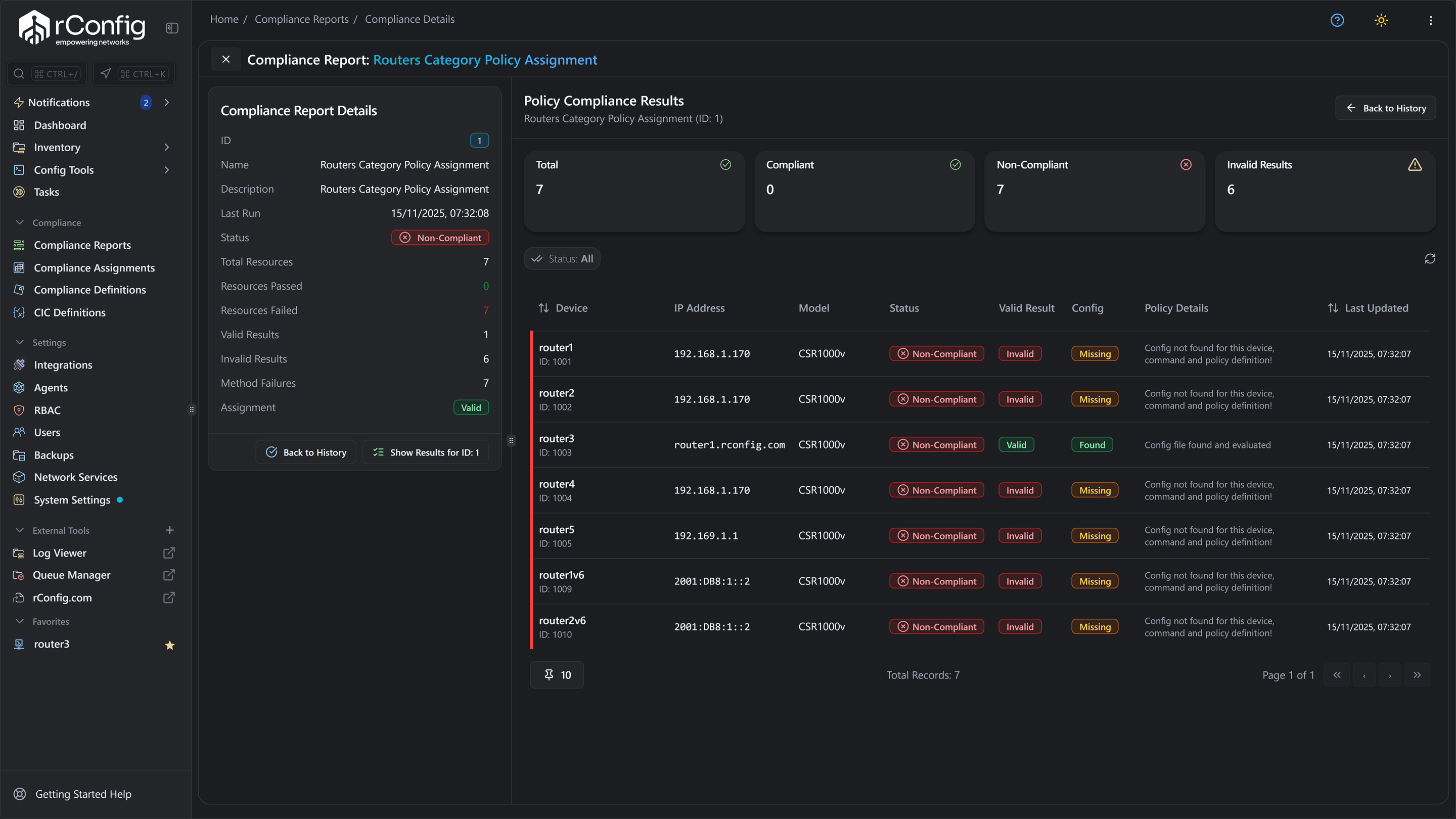
Check your rules
A policy compliance report. Each device shows compliant or non-compliant against the rules you wrote, with the reason. (Starter and above) Policy compliance docs.
Restore a config
Pick a saved version and rConfig builds the restore commands. You review them, then send them to the device from the queue. Needs a role that can send commands and valid device credentials. (Starter and above) Configuration restore docs.
The diff itself
Every backup is a version. Compare any two and rConfig shows the lines that were removed and the lines that were added. This is in free Core. Configuration diff docs. A configuration diff between version 17 and version 36 of one device's config.
Compare costs
The two tools are priced in different ways, so compare the model first and the number second.
Auvik
A subscription, quoted per billable network device. Access points, printers and UPS units are free. Auvik publishes no price list. There is a 14-day trial with all features.5
For how Auvik pricing works and which devices count, read our Auvik pricing explained guide.rConfig
Core is free with no device limit. Paid editions are a flat annual price by device band: Starter up to 300 devices, Standard up to 1,000, Enterprise above that. Restore and policy checks start at Starter. AI and script automation start at Standard.6
Not sure what counts as a device? Read how rConfig counts devices.
Try rConfig with your network
Five steps, one afternoon to start. There is no Auvik import and no integration between the two tools. Auvik lets you export any saved version as plain text, so you can keep your history.
Deploy rConfig
Install it on a Linux VM or in Docker. Core is free and takes an afternoon. A paid edition can start as an evaluation licence. Core install guide · V8 Pro install guide
Two ways to start- Linux VM or Docker
- Core, free, an afternoon to set up
- A paid edition on an evaluation licence
Add representative devices
Pick 10 to 20 real devices. Cover each vendor and each device type you run, not just the easy ones. Adding devices
What to cover- 10 to 20 real devices
- Every vendor you run
- Every device type, not just the easy ones
Check backups and diffs
Run a scheduled backup. Make a small change on one device. Back up again and read the diff. This is what you will look at most.
What you will look at most- A scheduled backup
- A change on one device
- A backup, then the diff
Test the paid capabilities you need
Policy checks and restore are in Starter and above. Write one rule and run it. Restore one config to a lab device. Do this on an evaluation licence, not in production. Policy compliance · Configuration restore
On an evaluation licence- Policy checks, Starter and above
- One rule, written and run
- One restore, to a lab device
- Not in production
Choose your setup
Decide whether rConfig replaces your configuration workflow or runs beside your monitoring tool. Then pick the edition by the features you tested and your device count. rConfig pricing · how rConfig counts devices
Replace or run alongside- Replaces your configuration workflow, or
- Runs beside your monitoring tool
- Edition picked by features tested and device count
Buyer questions
Does Auvik back up network configurations?
Yes. Auvik polls your devices for change, every 60 minutes by default, and saves a new backup when it finds one. It keeps every version and shows a colour-coded diff between any two. If backup and diff are all you need, Auvik already covers that.1, 2
Does Auvik restore a configuration to a device?
Not by itself. Auvik's own FAQ says it does not push configurations back to devices. You pick a version, export it as text, and apply it with the device's restore process. rConfig builds the restore commands from a saved version and sends them to the device for you. That needs the Starter edition or above.2, 11, 6
Does rConfig do monitoring, maps or traffic analysis?
No. rConfig backs up configs, shows what changed, checks your rules and restores a version. Auvik maps your network, monitors it, alerts you and analyses traffic. If you need those, keep Auvik or another monitoring tool and run rConfig beside it.4
Where does my configuration data live?
With Auvik, in Auvik's cloud service. With rConfig, on your own Linux server or Docker host. Nothing leaves it unless you send it. That matters if your configs hold credentials, or if your rules say network data stays on site.5, 7
What are policy checks, and are they the same as an audit trail?
No, they are different things. An audit trail records who did what and when. A policy check tests a saved config against rules you write, such as 'SSH must be on' or 'this banner must be present', and reports pass or fail per device. Auvik's configuration pages describe audit trails. rConfig runs policy checks in the Starter edition and above.1, 9, 6
Can I try rConfig for free?
Yes. rConfig Core is free and open source, with no device limit. It backs up configs, lets you search them, compares versions and tracks changes. It does not include restore, policy checks or automation. Those are in the paid editions, which you can test on a commercial evaluation.6, 13
How should I evaluate rConfig against Auvik?
Use the five steps above. Deploy rConfig, add a few real devices of each type you run, and check the backups and diffs. Then test the paid features you need on an evaluation licence. Ask us for a walkthrough if you want someone to drive.
What should I check in Auvik reviews?
Read reviews for the workflows you will use, not the star rating. For configuration work, look for comments on how often backups ran, how easy the diff was to read, and what restoring a config took in practice. Look for the reviewer's network size and device mix, and whether the review is recent. Weigh evidence over adjectives. This page is written by rConfig, so read it the same way and check our sources below. Auvik reviews on G2.
See rConfig on your own network
Bring your device list. We will show you the backups, the diffs, a policy check and a restore, and answer the questions this page could not.
Sources, checked 11 September 2026
- Auvik, Network Configuration Management (use case page and FAQ)
- Auvik, Network Configuration Backup (use case page and FAQ)
- Auvik, Configuration Backup and Restore
- Auvik, Network Management features
- Auvik, Pricing (the quote form and its pricing FAQ)
- rConfig pricing and editions
- rConfig docs, Configuration backups
- rConfig docs, Configuration diffs
- rConfig docs, Policy compliance
- rConfig docs, Change Manager overview
- rConfig docs, Configuration restore
- rConfig docs, Universal device support
- rConfig Core docs, Configuration backups
Auvik facts are quoted from Auvik's own pages on that date and may change. rConfig capability claims link to the product documentation; edition limits come from the rConfig pricing page.
Auvik is a trademark of its owner. This page is written by rConfig for evaluation purposes. Where Auvik's pages do not describe a capability, the page says so rather than claiming the product lacks it. Your agreement with either vendor governs your actual terms.