v8.3 is now available

Automated Network Configuration Backup Across Every Device

Protect your infrastructure with automated, secure, multi-vendor configuration backups. rConfig captures every change, versions it, and keeps it instantly recoverable.

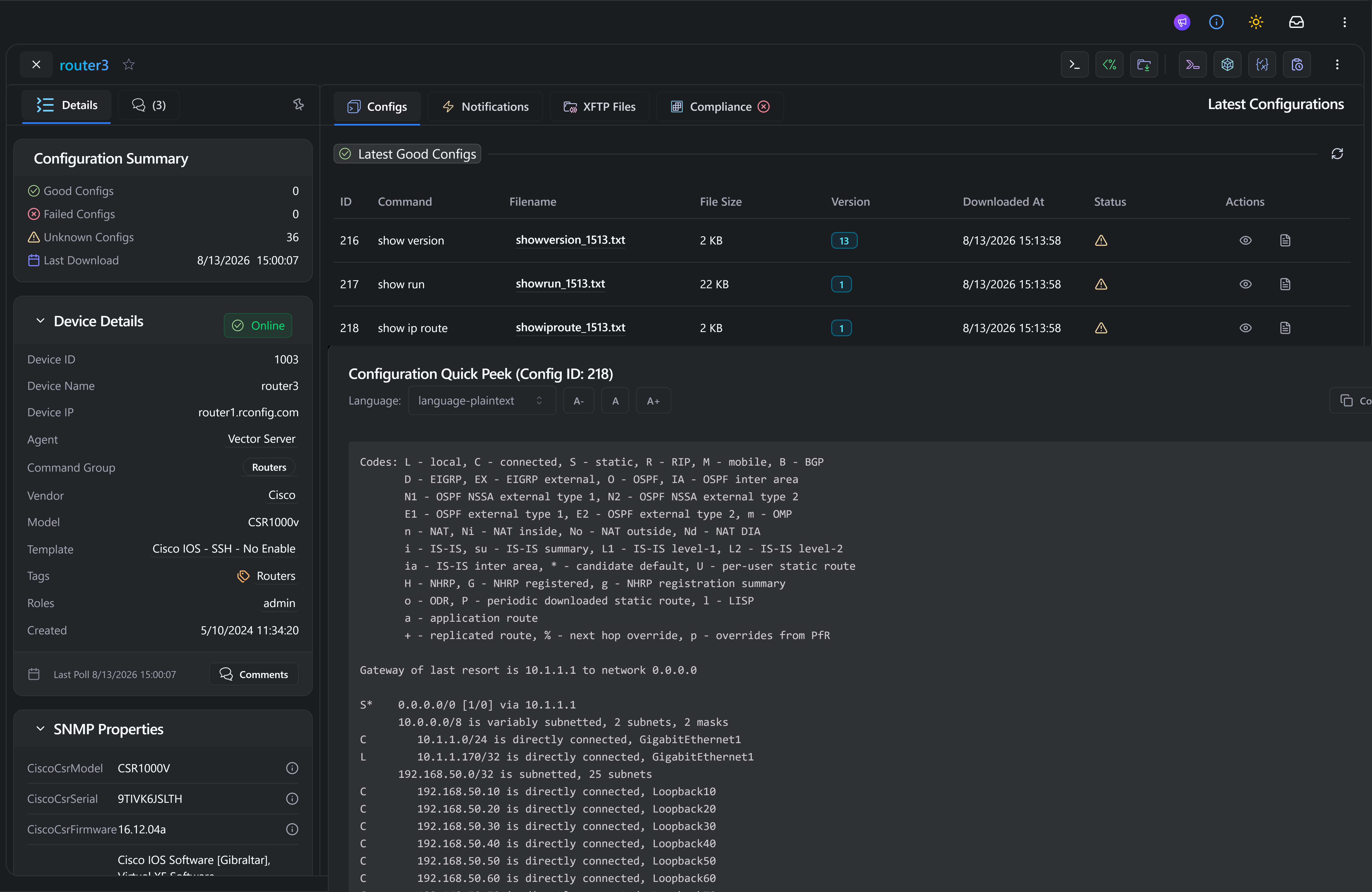
rConfig V8 interface showing configuration backups, device details and saved network configurations
TRUSTED WORLDWIDE
  • SNCF
  • Siemens Energy
  • Equans
  • Bacardi
  • JCDecaux
  • Assurant
  • CVS Health
  • Singtel
  • Royal London
  • P&G
  • Motorola
  • Jysk
WHY IT MATTERS

Why Network Configuration Backup Matters

Manual backups are uneven, undated and easy to forget. Automate the process to defend the network against outages, drift and audit findings. Watch demo: Config & State Backups

  • Prevent Costly Outages

    Configuration mistakes, failed upgrades or accidental wipes can take critical systems down. Automatic backups make recovery a one-click operation, not a fire drill.

  • Meet Compliance Requirements

    ISO/IEC 27001, NIST SP 800-128 and CIS Controls all require centralised, auditable configuration backup processes. rConfig produces the evidence trail auditors ask for.

  • Eliminate Manual Effort

    Stop relying on shell scripts, cron jobs or engineer memory. Backups run on schedule, on every change, with no operator in the loop.

  • Consistency Across Vendors

    rConfig unifies backups across Cisco, Juniper, Fortinet, HP, Palo Alto, Arista, VMware, and more. One backup model, one audit trail, every device.

CAPABILITIES

Powerful Network Configuration Backup Features

The smart network config backup tool, rConfig delivers complete visibility, automation and control for your network’s most critical data, your configurations.

  • Automated Scheduled Backups

    Run backups hourly, daily, weekly or on demand. No human intervention required.

  • Real-Time Backup on Change

    Capture configs instantly if a device changes, ensuring nothing slips through.

  • Versioning and Rollback

    Every backup is versioned. Roll back to any previous state with one click.

  • Secure Storage & Encryption

    Configurations stored securely with encryption, audit trails and access controls.

WORKFLOW

How rConfig's Network Configuration Backup Works

Four stages, fully automated. From device discovery to one-click restore, every step runs without an operator in the loop.

  1. Discover and Inventory Devices

    Automatically import devices from spreadsheets, APIs, Zabbix, or manual input.

  2. Run Scheduled or Triggered Backups

    Define backup policies per group, vendor or schedule.

  3. Version, Encrypt and Store Configurations

    Store each configuration with metadata, timestamps, diff history, hash validation.

  4. Restore Instantly When Needed

    Push configs back through rConfig via restore or rollback workflows.

IN PRACTICE

Who Uses Our Network Configuration Backup Software

The same backup engine, framed three ways. Pick the workflow that looks like yours.

FAQ

Frequently Asked Questions

Everything you need to know about network configuration automation.

Why are automated configuration backups important?

Automation eliminates human error and ensures backups happen consistently. Without automation, backups are often forgotten, leading to extended downtime during outages when no recent configuration is available.

How does rConfig back up configs from multi-vendor devices?

rConfig uses SSH, Telnet and APIs to connect to devices. It supports CLI commands for legacy devices (like Cisco IOS, Juniper Junos) and API calls for modern infrastructure (Palo Alto, Meraki), normalising the process across all vendors.

Is configuration data encrypted?

Yes. rConfig encrypts configuration data at rest and in transit, ensuring sensitive information like passwords, keys and architecture details remain secure.

Can I restore a configuration from backup?

Absolutely. rConfig provides a restore workflow allowing you to push a specific version of a configuration back to a device directly from the dashboard.

Does rConfig support versioning and rollback?

Yes. Every time a backup runs, rConfig compares it to the previous version. If changes are detected, a new version is created. You can view diffs between versions and roll back to any previous point in time.

How does rConfig ensure compliance with ISO/NIST/CIS frameworks?

rConfig provides an auditable history of all configuration changes, centralised secure storage and policy enforcement. This helps satisfy the configuration management controls found in frameworks like the NIST Cybersecurity Framework, CISA's compliance resources and the EU's NIS2 Directive.

Stop Manual Network Configuration Backups. Let rConfig do it.

Automated, multi-vendor configuration backups with versioning, encryption, and one-click restore. Setup takes 15 minutes.

No credit card required for trial · Setup in 15 minutes