Enterprise-Grade Protection

Effortless Rollbacks & Version Control

Track, revert, and secure configuration changes with automated rollbacks, ensuring stability, uptime, and compliance across your entire network infrastructure.

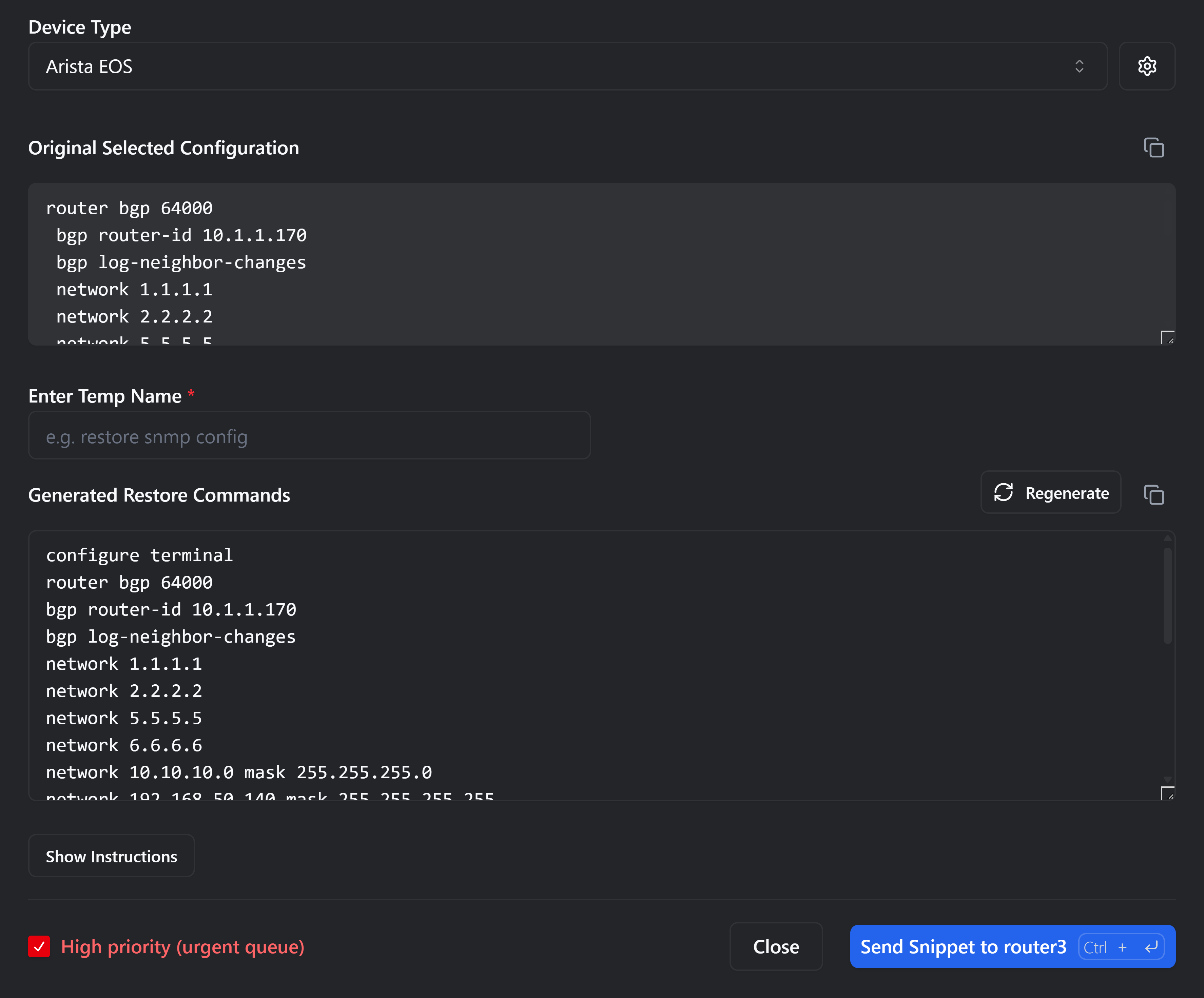
Recovery & Rollback in the rConfig V8 interface
TRUSTED WORLDWIDE
  • SNCF
  • Siemens Energy
  • Equans
  • Bacardi
  • JCDecaux
  • Assurant
  • CVS Health
  • Singtel
  • Royal London
  • P&G
  • Motorola
  • Jysk
WHY IT MATTERS

Why Rollback Matters

Network stability relies on the ability to undo mistakes. rConfig provides the safety net your infrastructure needs.

  • Configuration Drift & Unintended Changes

    Unauthorized or accidental changes can compromise security. Detect them instantly before they cause outages.

  • Rollback & Version Control

    Prevent outages with instantly restorable configuration histories. One-click reversion to a safe state.

  • Avoid Downtime & Interruptions

    Consistent versioning makes recovery fast, predictable, and safe. Reduce MTTR from hours to minutes.

  • Smart Diff Viewer

    Instantly see what changed with side-by-side comparisons. Highlight additions, removals, and modifications clearly.

CAPABILITIES

Advanced Features Built for Network Professionals

Beyond simple backups, rConfig provides a comprehensive version control system designed specifically for the complexities of modern network infrastructure.

  • Automated Rollbacks

    Instantly restore the last known good configuration without manual CLI intervention.

  • Change Tracking

    Track change history across all devices with full context of who, what, and when.

  • Compliance Logging

    Meet ISO, NIST, CIS, and audit requirements with tamper-proof logs of every revision.

  • Version Snapshots

    Freeze and tag known-good states before changes or deployments for safe experimentation.

VERSION SNAPSHOTS

The Power of Version Snapshots

Snapshots act as your safety net during critical updates. Before deploying a complex change, create a labeled snapshot. If the deployment causes latency or connectivity issues, you can revert to that exact timestamp in seconds, not hours. This capability is essential for experimental safe rollouts and rapid incident response recovery.

Learn more about Snapshots
  • Before-change snapshotting
  • Experimental safe rollouts
  • Incident response recovery
  • Custom labels and metadata
WORKFLOW

How It Works

A simple, transparent process to ensure network integrity. Watch demo: Config Diffs

  1. Detect Changes

    rConfig continuously monitors your configuration state for deviations from the baseline.

  2. Analyze Diffs

    Compare versions, understand the impact, and verify specific lines changed before rollback.

  3. Roll Back Safely

    Instantly revert to a known good version with guaranteed consistency and validation.

  4. Log & Audit

    Every action, user, and timestamp is logged for strict compliance and reporting.

IN PRACTICE

Real-World Rollback Scenarios

  • Disaster Recovery

    “We reverted 400 devices after a failed script, no downtime.”
    Mass recovery in minutes, not days.

  • MSP Client Environments

    “Managing 50 different client networks requires a safety net.”
    Rollback at scale across multi-tenant environments.

  • Security & Compliance

    “Auditors love the granular history of every change made.”
    Meet ISO 27001, GDPR, NIST, and CIS requirements.

FAQ

Frequently Asked Questions

How does rollback work in rConfig?

rConfig stores snapshots of every configuration change. When you initiate a rollback, the system pushes the selected previous configuration version to the device via SSH/Telnet, verifying the application was successful.

What happens during a version restore?

The system identifies the diff between the current running config and the target version. It then applies the necessary commands to revert the state, or fully replaces the config depending on your settings.

Does rConfig track every change automatically?

Yes. rConfig can be scheduled to download configurations as frequently as needed, or triggered via webhooks. Any detected difference generates a new version history entry.

Is the diff viewer included by default?

Yes, the smart diff viewer is a core feature available on all plans. It provides side-by-side comparison with color-coded additions and removals.

Can audit logs be exported for compliance reporting?

Absolutely. All rollback actions, who performed them, and when they occurred are logged. These logs can be exported to PDF, CSV, or external SIEM tools.

Can I roll back multiple devices simultaneously?

Yes, rConfig supports bulk operations. You can select a group of devices and roll them back to a specific timestamp or tagged snapshot version.

Start Managing Rollbacks Like a Pro

Avoid misconfigurations, downtime, and compliance failures with automated rollbacks and comprehensive version control.